Georeserve
Leaflet Storymaps with Google Sheets
Customize your Leaflet story map with linked Google Sheets template and scrolling narrative. Supports images, audio and video embeddings, and Leaflet TileLayer/geojson overlays.
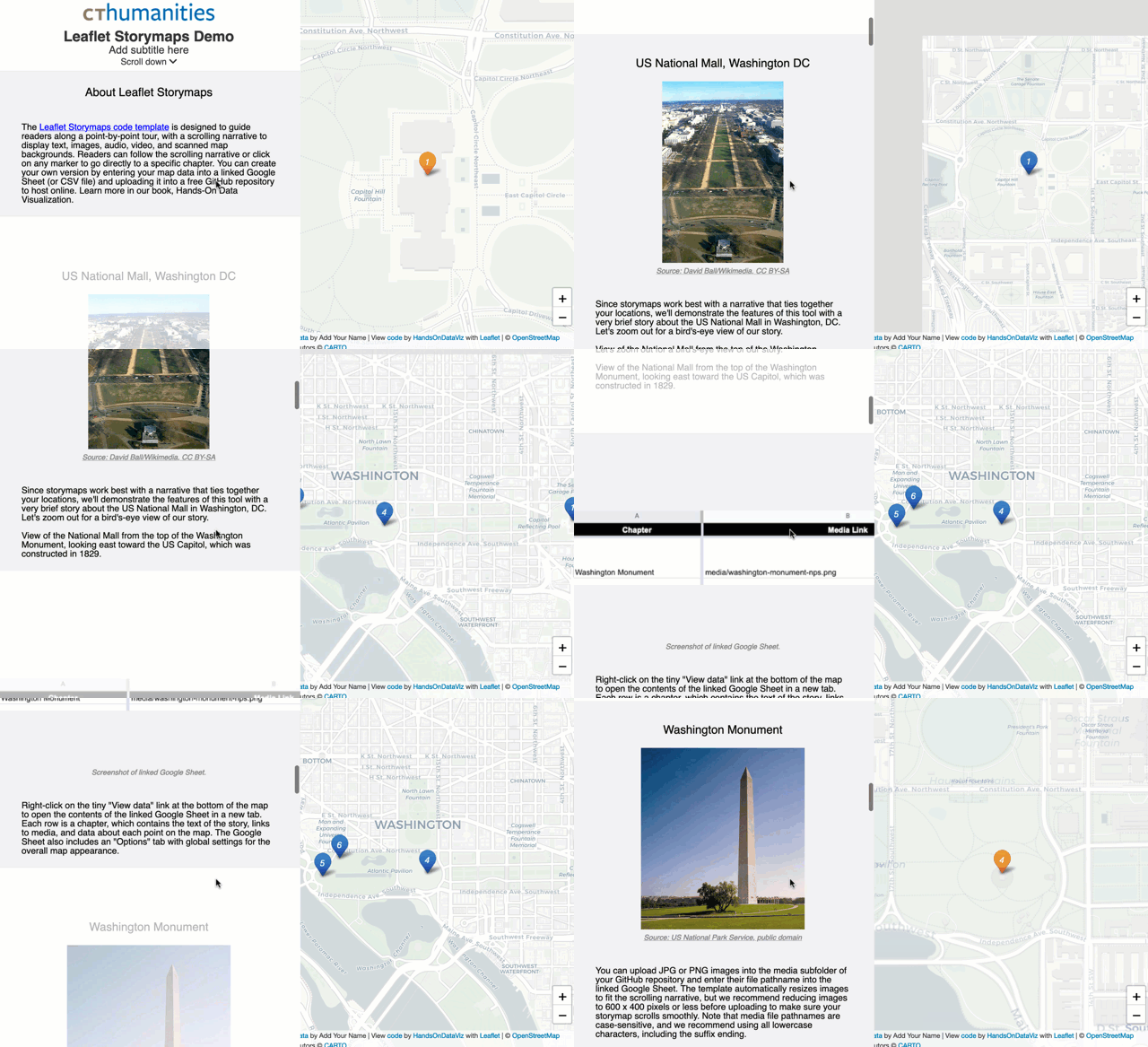
Live links (replace with your own)
- Leaflet Map https://bounouaismail.github.io/geoprtail-storymap-/#1
- Google Sheets template https://docs.google.com/spreadsheets/d/1AAwVm8T3v737acJUqpk9PlCOlKYLXXrLmkeFutuiiFA/edit?usp=sharing
Create Your Own
- See step-by-step tutorial in Hands-On Data Visualization https://HandsOnDataViz.org/leaflet-storymaps-with-google-sheets.html
Geocode your address data with Google Sheets add-on
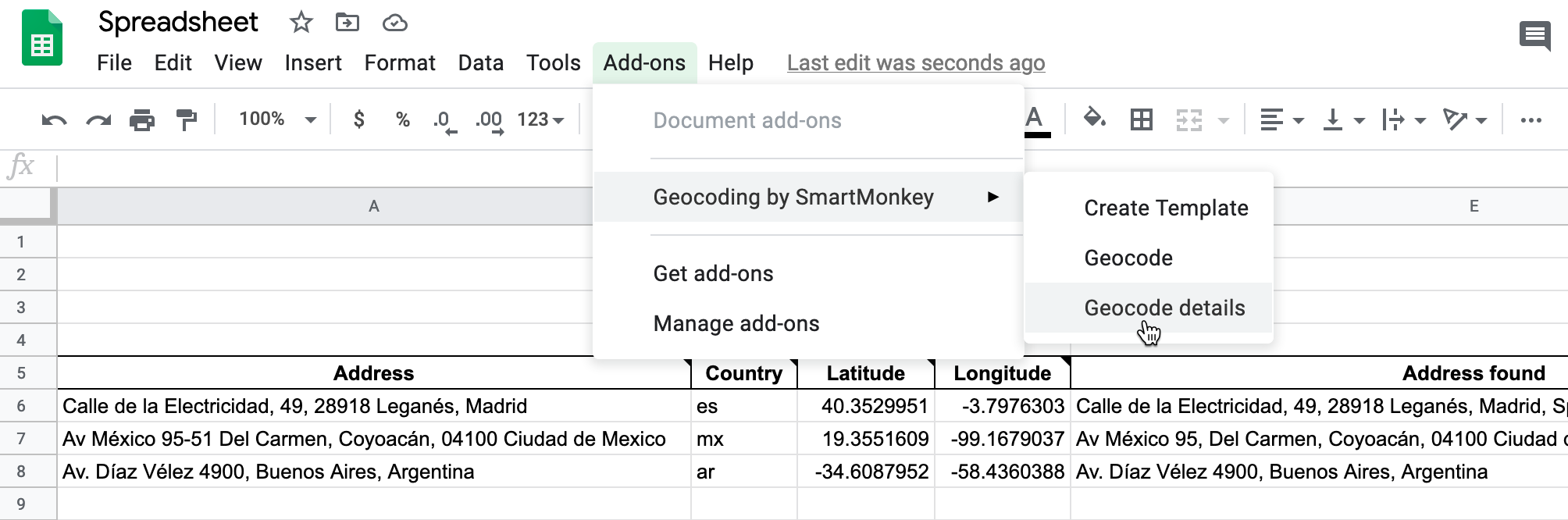
To geocode (find latitude and longitude coordinates), we recommend installing the free Geocoding by SmartMonkey add-on for Google Sheets. Insert your addresses in place of the samples in the Geocoding Details tab, then use Add-Ons > Geocoding > Geocode Details menu. Learn more in Hands-On Data Visualization https://handsondataviz.org/geocode.html
To finalize your map, you need to either:
- Download each Google Sheets tab as a CSV file and upload into a
csvsubfolder in your GitHub repo- OR
- Get your own Google Sheets API Key to insert into
google-doc-url.js
See more in the tutorial https://handsondataviz.org/leaflet-storymaps-with-google-sheets.html
Update your code for any pre-October 2020 storymaps before January 2021
If you used our code to create a storymap prior to October 2020, you will need to update your version before January 26, 2021 for it to continue to work. Google announced that it will migrate from Google Sheets API v3 to v4 in Jan 2021, and we released our update of Leaflet storymaps code v1.2 on September 29th to address Google’s changes.
Three options to update your code:
Option A: If you understand (or are willing to learn about) GitHub Desktop, use it to move copies of the newer code (index.html, scripts folder, markers folder, style.css, etc.) into your repo via your local computer. In the google-doc-url.js file, copy and paste the Google Sheets API key that appears in the lower half of our code, but keep your own Google Sheets ID that appears in the upper-half of your code.
OR
Option B: If you originally “forked” a copy of our code, create a GitHub “pull request” to update your repo with our code revisions, including the Google Sheets API key. We recommend this option only if you understand (or are willing to learn about) GitHub pull requests, and can deal with resolving conflicts between your code and our updated code. Warning: Since this operation might overwrite some of your code, go to Code > Download ZIP to make a backup to your local computer.
- Log into the web interface of your GitHub storymap repository.
- Click Pull requests and click the green button for a New pull request.
- On the Comparing Changes page, use the menus to pull code into your repo from the original repo, named HandsOnDataViz/leaflet-storymaps-with-google-sheets. GitHub may warn that you cannot automatically merge the files, but proceed anyways.
- You may need to click the Resolve conflicts button on the next screen, which means you need to sort out which portions of your code to keep and which portions of our code to accept. Generally speaking, you should accept our updates for index.html, style.css, and most scripts.js, while keeping your own content for README.md, media, and geojson folder content. In the google-doc-url.js file, you should keep your own Google Sheet ID, but temporarily add our Google Sheets API key until you create your own. In GitHub, you can resolve code conflicts by deleting/keeping lines in specific files.
OR
Option C: Start over with a brand-new repo, and migrate your existing map content. Make a copy of our newer code by clicking the green ‘Use template’ button. Migrate any media folder or geodata folder content from your old repo to your new repo, by downloading to your local computer and uploading to GitHub. Reconnect your Google Sheet ID to the google-doc-url.js file in your new repo.
Email us at HandsOnDataViz@gmail.com if you need assistance with updating your code.
Credits (and licenses)
Developed by Ilya Ilyankou and Jack Dougherty with support from Connecticut Humanities and Trinity College, CT. Inspired by Code for Atlanta mapsfor.us (2016) https://github.com/codeforatlanta/mapsforus (BSD-3-Clause). Adapted from MUX Lab, Map Effects 100: https://github.com/muxlab/map-effects-100, see http://muxlab.github.io/map-effects-100/Leaflet/11_scroll-driven-map-navigation.html.
We use Google Sheets API version 4, with these open-source components:
- Leaflet v1.7.1 https://leafletjs.com (BSD-2-Clause)
- jQuery v3.5.1 https://code.jquery.com (MIT)
- PapaParse v5.3.0 to parse CSV with JavaScript (MIT)
- Font Awesome v5.8.1 https://cdn.fontawesome.com (MIT, SIL OFL 1.1)
- leaflet-providers (v1.10.2) https://github.com/leaflet-extras/leaflet-providers (BSD-2-Clause)
- Leaflet.awesome-markers (v2.0.4), manually updated to svg to allow hex and material icons https://github.com/sigma-geosistemas/Leaflet.awesome-markers (MIT)
- Leaflet.ExtraMarkers (v1.0.5) https://github.com/coryasilva/Leaflet.ExtraMarkers (MIT)
- jQuery-CSV (v1.0.11) https://github.com/evanplaice/jquery-csv (MIT)
- Single Element CSS Spinner (31 May 2016) https://github.com/lukehaas/css-loaders (MIT)
- Lightbox by Lokesh Dhakar (v.2.11.3) https://github.com/lokesh/lightbox2 (MIT)